
How to Install and Use Claude SEO: A Step-by-Step Guide
This guide is based on the open-source project Claude SEO by AgriciDaniel, licensed under MIT.
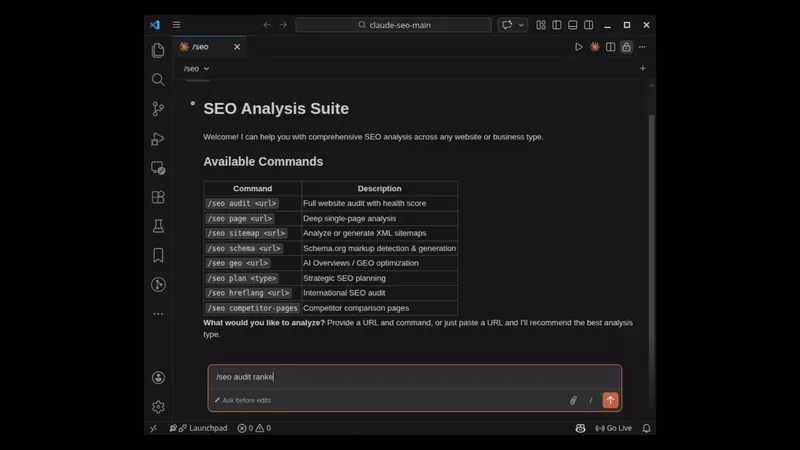
Claude SEO is a free, open-source plugin and skill pack for Claude Code that audits a website and produces a prioritised, scored action plan. It is not a dashboard, and not a replacement for a large backlink or rank database. Its value is explanation, prioritisation, AI-search coverage, and follow-up questions in plain English, with reports saved as Markdown on your machine.
The project describes 26 sub-skills and 19 specialist agents, with up to 17 agents working in parallel on a full audit taking about 10–15 minutes. Those numbers are expectations, not promises: a large, slow, or blocking site will change the experience.
What Claude SEO is, and who it is for
A full audit crawls up to 500 pages, detects the business type, delegates work to specialist subagents, generates a 0–100 SEO Health Score, and creates a full audit report and an action plan, plus screenshots when Playwright is available. The coverage is broad: technical SEO, content quality and E-E-A-T, Schema.org structured data, AI-search readiness, agent readiness, local SEO, e-commerce SEO, international SEO, backlinks, and reporting.
It is aimed at SEO agencies that want frequent, repeatable audits and change monitoring; in-house SEO teams at SaaS, publishing, and e-commerce companies; and freelance SEO consultants who want a first-call audit, score, and list of top fixes. If you only need a single-page check, you do not need the full audit: a one-page command exists for exactly that, and it is faster.
Two limits are worth stating early. Without Google API keys, Core Web Vitals are lab estimates and indexing is inferred, not confirmed from Google's data. Pages that load key content only after scrolling or clicking can also give noisy results.
Prerequisites
- Claude Code, version 1.0.33 or newer for the plugin install, with the Claude Code CLI installed and configured.
- Python 3.11–3.14, with pip. The installation guide notes that Python 3.10 reached end of life in October 2026, and that 3.15 waits on the Google Ads client library, so do not assume a newer Python will just work.
- Git, for cloning the repository in the manual install.
- A Claude Code plan. The README describes Claude SEO as free with your Claude Code plan. A full audit uses more plan usage than a single-page check, because five agents that need more judgement run on Opus and the rest on Sonnet.
- No API keys out of the box. The FAQ states this plainly: Claude SEO works without keys. Optional real field data can come from free Google APIs — PageSpeed Insights, Chrome UX Report, Search Console, and Google Analytics 4 — configured later with the Google setup command. Keys stay on your machine.
- Playwright Chromium, only for some features. The installer attempts it automatically, and failure is non-fatal. It is needed for single-page-application rendering and screenshots; the setup command creates the isolated Python runtime and headless browser.
The README and installation guide I checked do not state a CPU or memory minimum for the core tool. The only extension-specific runtime note found was Node 18 or newer for Unlighthouse.
Step 1: Install with the plugin — the recommended route
Run these commands inside Claude Code:
/plugin marketplace add AgriciDaniel/claude-seo
/plugin install claude-seo@agricidaniel-claude-seo
/seo setup
The third command is not optional decoration. It is an explicit, one-time provisioning step that writes the virtual environment and browser only to Claude's persistent plugin data. Plugin installation itself does not run package managers, so if you install the plugin and skip setup, you have not finished installing.
To verify the install, start Claude Code and run:
claude
/seo
/seo doctor
If /seo is not recognised, the troubleshooting docs suggest verifying the plugin with /plugin list and reinstalling it, then restarting Claude Code. Do not start by reinstalling everything else; check the plugin first.
Step 2, alternative: manual install
If you prefer a manual install, or you need to inspect what the installer does, clone the repository and run the installer. On macOS or Linux:
git clone --depth 1 https://github.com/AgriciDaniel/claude-seo.git
bash claude-seo/install.sh
A review-then-run alternative is also documented: download the installer, read it, run it, and delete it afterwards. That is a good habit for any installer script, not just this one.
The full manual sequence in the installation guide adds a doctor check at the end:
git clone https://github.com/AgriciDaniel/claude-seo.git
cd claude-seo
./install.sh
~/.claude/skills/seo/scripts/claude-seo doctor
On Windows PowerShell, the documented route is:
git clone --depth 1 https://github.com/AgriciDaniel/claude-seo.git
powershell -ExecutionPolicy Bypass -File claude-seo\install.ps1
The docs say the Windows path deliberately uses git clone rather than piping a remote script into a shell, because Claude Code's security guardrails flag piped remote-script execution.
Step 3: Run your first audit
Start Claude Code, then run a full audit on a site you own or have permission to audit:
/seo audit https://example.comReplace the example address with the real site. The audit crawls up to 500 pages, detects the business type, and produces a report and an action plan. Expect it to take longer on a large site, and expect the action plan, not the raw report, to be the document you actually work from. A score without a prioritised list of fixes is interesting; a score with one is useful.
For a faster, deeper check on one page, use:
/seo page https://example.com/pricingThat is the right command when iterating on a single page. Other first-use commands:
/seo geo https://example.com
/seo schema https://example.com
/seo local https://example.com
The first checks AI-search readiness, the second checks and generates structured data, and the third covers local SEO and the Google Business Profile. Run them one at a time and read the output.
Core features, grouped by job
The command list is long — 30 core and extension commands in six groups — so group them by job, rather than memorising a list.
Audits and planning. The planning command takes a business type: SaaS, local, e-commerce, publisher, or agency. Choosing the right type matters, because those businesses do not have the same priorities.
Technical SEO. The technical command covers nine categories, and there are focused commands for sitemaps, images, hreflang, programmatic SEO, and Google services. A particularly useful habit is drift tracking: take a baseline snapshot, then compare later runs against it, so you can see what changed rather than re-reading a whole report and guessing.
Content and E-E-A-T. Content commands cover page content, briefs, keyword clusters, search-experience optimisation, content flow, and competitor pages — checking whether content demonstrates expertise, experience, authority, and trust.
Schema and AI search. The schema command detects, validates, and generates Schema.org markup. The GEO command checks readiness for AI Overviews and generative search, and the agentic command checks agent readiness, including Lighthouse Agentic Browsing, llms.txt, Markdown delivery, and WebMCP. The fix form drafts robots and Content-Signal lines, llms.txt, an AI catalogue file, and WebMCP scaffolds for review. Nothing is deployed by that command, which is important: you review first, then deploy through your normal process.
Local, links, and commerce. Local commands cover local SEO and maps, backlink commands cover link profiles, and the e-commerce command covers shop-specific issues. These are separate because the evidence and the fixes are separate: a local problem is not solved with a content brief, and a backlink problem is not solved with a sitemap fix.
Google APIs, optional. If you add free Google API access, you can use PageSpeed Insights, Chrome UX Report, Search Console inspection, and Analytics 4 commands, plus quotas and a polished PDF or HTML report from a full audit. Without those keys, remember the limit stated earlier: Core Web Vitals are lab estimates and indexing is inferred. Add the keys when you need field data, not as a reflex at install time.
Extensions, optional. The core works without extensions. Optional extensions cover image generation, SE Ranking, Profound, Bing, Unlighthouse, and others. Install one only when you have a specific job for it and, where relevant, your own account with that service.
Common errors and fixes
These fixes are grounded in the official troubleshooting and installation documentation. No individual GitHub issue is cited here, because a specific issue page was not verified for this guide; the fixes below are doc-grounded, not issue-number-grounded.
| Problem | Fix |
|---|---|
/seo is not recognised | Verify the plugin with /plugin list, then reinstall it. For manual installs, check ~/.claude/skills/seo/SKILL.md starts with YAML frontmatter, restart Claude Code, and re-run the installer. |
| Python error such as “No module named 'requests'” | Do not install individual packages, use pip --user, or create a PATH shim. For plugin installs, run /seo doctor then /seo setup; for manual installs, run the equivalent claude-seo doctor and setup scripts. |
| “requirements.txt not found” after install | For plugin installs, reinstall the plugin. For manual installs, check ~/.claude/skills/seo/requirements.txt, or download it to that path from the raw GitHub URL given in the troubleshooting doc. |
| Windows: “python is not recognized” | Install Python from python.org with “Add to PATH”, then rerun install.ps1. The installer uses CLAUDE_SEO_PYTHON when set, otherwise tries py -3, python3, and python in the supported 3.11–3.14 range. |
| Playwright screenshot error, such as “Executable doesn't exist” | Rerun managed setup so the browser is installed through the same interpreter and persistent browser directory, then run /seo doctor. Chromium failure alone is degraded, not fatal: raw-fetch analysis remains available. |
| Permission denied on Unix | Make the scripts executable with chmod +x ~/.claude/skills/seo/scripts/*.py. |
| Subagent not found, such as “Agent 'seo-technical' not found” | For plugin installs, check /plugin list and reinstall, since subagents load from the plugin, not from ~/.claude/agents/. For manual installs, verify the agent files and frontmatter, then re-copy agents from the clone. |
| Timeouts, or a very slow full audit | Retry, check the target site's speed and your network, and note that some sites block automated requests. A slow full audit is expected on large sites up to the 500-page crawl; use /seo page for faster single-URL checks. |
| Schema validation false positives | Ensure placeholders are replaced, @context is https://schema.org, and check for deprecated or retired types; validate in Google's Rich Results Test. |
FAQ
Do I need API keys? No, not out of the box. The FAQ says Claude SEO works without them. Add Google API access later if you want real field data, Search Console data, or Analytics data.
Do I need Claude Code? Yes. Claude SEO is a plugin and skill pack for Claude Code, not a standalone web app. You need Claude Code installed and configured, plus a Claude Code plan.
How long does a full audit take? About 10–15 minutes is the documented expectation, but large sites, slow sites, and sites that block automated requests will take longer. Use a single-page audit when you need a fast answer.
Can I uninstall it cleanly? Yes. For a plugin install, uninstall the plugin and remove the marketplace entry. For a manual install, the documented uninstall script is in the repository. Either way, check that the skill and agents are gone before reinstalling, or you can end up debugging a stale copy.
Is Claude SEO a replacement for a crawler or a rank tracker? No. The README is explicit that crawlers such as Screaming Frog crawl faster and deeper. Claude SEO's value is in explaining findings, prioritising fixes, covering AI search, and letting you ask follow-up questions in plain English.
What to try next
Once the basics work, run a full audit on a site you are allowed to audit, then work through the action plan in priority order. After changes, use drift tracking to compare against your baseline, and re-check any page you rewrote.
This guide was written with AI assistance and checked against the official documentation as of October 30, 2026.
Sources
- https://github.com/AgriciDaniel/claude-seo
- https://github.com/AgriciDaniel/claude-seo/blob/main/LICENSE
- https://github.com/AgriciDaniel/claude-seo/blob/main/docs/INSTALLATION.md
- https://github.com/AgriciDaniel/claude-seo/blob/main/docs/TROUBLESHOOTING.md
- https://github.com/AgriciDaniel/claude-seo/blob/main/docs/COMMANDS.md
- https://github.com/AgriciDaniel/claude-seo/blob/main/extensions