
How to Install and Use Graphify: A Step-by-Step Guide
This guide is based on the open-source project Graphify by Graphify-Labs, licensed under Apache-2.0.
Graphify turns a codebase into a queryable knowledge graph, so an AI coding assistant can ask the graph a precise question instead of grepping through files. Code is parsed locally with tree-sitter, without embeddings or a vector store, and every edge is tagged as explicitly present in the source or inferred by Graphify.
This guide follows the project's current documentation. The repository's default branch is v8. Run graphify --version and graphify --help after installing, and treat those outputs as the authority for your version.
What Graphify is, and who it is for
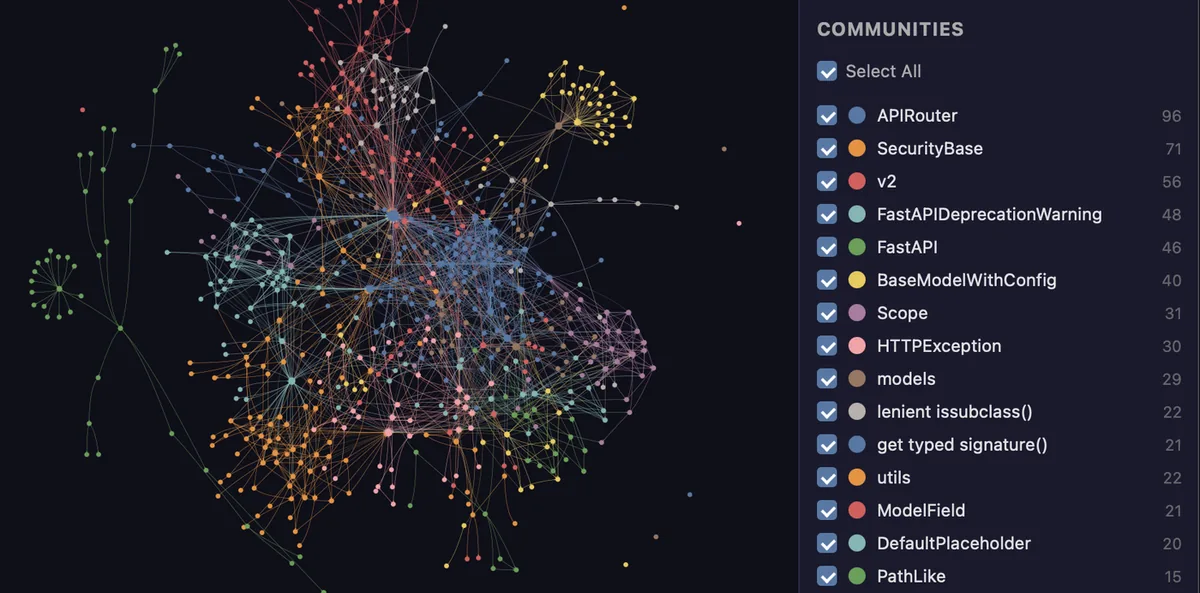
In a normal workflow, you build a graph for a project, then your assistant consults that graph first. The usual output is a graphify-out/ folder containing a visual graph, a report, and the graph data itself. From there you can ask what connects one part of the system to another, trace the path between two components, explain a single node and its neighbours, or find everything that depends on a piece of code before you change it.
It is for individual developers and teams who already use an AI coding assistant and want scoped, explainable context: architecture review, onboarding into an unfamiliar codebase, pull-request review, and shared team context. It is not a replacement for reading code, and it is not a general-purpose search engine. Its strength is structure: who calls whom, what depends on what, and which ideas cluster together.
Documentation, SQL schemas, PDFs, images, and media can also be mapped into the same graph, but start with code only and add the rest deliberately.
Prerequisites
- Python 3.10 or newer. Check it with
python --version. - uv (recommended) or pipx. Check them with
uv --versionorpipx --version. On macOS, a quick route isbrew install [email protected] uv; on Windows,winget install astral-sh.uv; on Ubuntu or Debian, install Python and pipx, or install uv with the official installer script. - A project to analyse. You need a local codebase, or at least a folder of code, to build a graph from.
- An AI coding assistant, if you want the assistant workflow. Graphify supports Claude Code, Cursor, Codex, Gemini CLI, GitHub Copilot, and many others; the exact registration command depends on the platform, as shown below.
- No API key for code-only use. Code extraction runs fully offline, and
--code-onlyskips documents and media that would need a model.
The documentation I checked does not state a CPU or memory minimum for Graphify itself. A very large codebase or a local model will obviously use more; the documented levers for slow local extraction are in the troubleshooting section.
Step 1: Install the CLI — watch the package name
The most important detail in this whole guide is a spelling trap. The PyPI package is graphifyy, with a double y. Other graphify* packages are not affiliated, according to the README. The command you run afterwards is still graphify.
Install with uv, the recommended route, or with pipx:
uv tool install graphifyy
# or:
pipx install graphifyy
A plain pip install graphifyy is also documented, but may need PATH setup afterwards. If graphify is not found after a uv install, the documented fix is to run uv tool update-shell and open a new terminal.
Next, register Graphify with your assistant. The simplest form detects your assistant:
graphify installFor a project-scoped install, so the skill lives with that repository rather than with your user account, use:
graphify install --projectPlatform-specific forms are documented for many assistants, including:
graphify install --platform codex
graphify install --platform gemini
graphify install --platform copilot
graphify cursor install
graphify vscode install
Note one platform quirk from the README: Codex uses $graphify instead of /graphify. If a command works in one assistant and not another, check the platform form first before assuming the install failed.
Step 2: Configure a model backend, only if you need one
Code-only extraction needs no model and no API key. You need a backend when you want semantic extraction over documents or media, community labelling, or other model-assisted steps. The documented auto-detection order is Gemini, then Kimi, Claude, OpenAI, DeepSeek, Azure, Bedrock, and Ollama, and you can choose explicitly with --backend or by setting GRAPHIFY_BACKEND to a backend name. Setting it to none disables model backends.
The keys named in the README include Gemini/Google, Moonshot, Anthropic, OpenAI, and DeepSeek keys; a running Ollama instance; AWS credentials for Bedrock; or the claude CLI binary, which uses a Claude subscription rather than an API key. Keep keys in your own environment, never in a shared repository.
Optional extras follow this pattern: uv tool install "graphifyy[<extra>]", with extras for PDF, office documents, video, MCP, watching, Neo4j, Leiden detection, Ollama, OpenAI, Gemini, Anthropic, Bedrock, SQL, and more, plus an all extra. Azure is a documented exception: it uses the OpenAI extra with the Azure backend. Install only extras you will use.
Step 3: Build your first graph
From inside your AI assistant, build a graph for the current folder with:
/graphify .That is the friendly route, and it is the one most people should start with. The headless CLI equivalent, useful in scripts or when the assistant is not involved, is:
graphify extract . --code-onlyStart with --code-only even if you plan to add documents later: it keeps the first build fast and gives you a clean baseline. After the build, check the output folder's visual graph, report, and JSON data.
Re-extracting only changed files, rather than rebuilding everything, is done with:
/graphify ./docs --updateor, from the CLI, graphify update .. If you deliberately removed or refactored a lot of code and the update refuses to replace a smaller graph, graphify update . --force is the documented way to allow it. Do not use --force casually: it exists for intentional removals, not as a routine refresh.
Step 4: Query, trace, and explain
Once a graph exists, the three commands you will use most are query, path, and explain. In the assistant they are slash commands; from the CLI they are:
graphify query "what connects auth to the database?"
graphify path "UserService" "DatabasePool"
graphify explain "RateLimiter"
A query returns a scoped subgraph, not a dump of the whole codebase. A path traces the shortest route between two named components. An explanation focuses on one node and its neighbours. That scoping is the point: the assistant gets enough context to answer well, without being flooded with unrelated files.
graphify affected walks reverse edges to find dependents before you change a shared function, and graphify god-nodes lists the most-connected nodes. Exit codes: 0 means an answer was found, 3 means several nodes matched and candidates were printed, and 4 means nothing matched.
Communities group related nodes together, using Leiden detection with a Louvain fallback if the Leiden extra is not installed. You can re-run clustering without re-extracting, and rename communities with a model.
Step 5: Keep the graph fresh, and share it
A stale graph is worse than no graph, because it confidently describes code that no longer exists. Update after pulls and merges — the docs are explicit that hooks do not cover every case — consider graphify hook install or graphify watch (watch needs the watch extra), and share graph.json and the report so everyone queries the same version.
Documented exports include HTML, call-flow HTML, Obsidian, a Markdown wiki, SVG, GraphML, Neo4j, and FalkorDB, and graphify tree produces a tree view. For pull requests, graphify prs provides a dashboard with --triage and --conflicts; triage needs a model backend, and PR commands need gh installed and authenticated.
Configuration is small: Graphify honours .gitignore, --exclude patterns, and .graphifyignore, and project settings live in .graphifyrc, one key=value per line. Start with ignore rules for generated, vendored, and build output.
Common errors and fixes
These fixes are grounded in the official troubleshooting and CLI reference documentation. If yours is not listed, the docs direct users to open a GitHub issue or join Discord, including the version, operating system, exact command, and a sanitised error.
| Problem | Fix |
|---|---|
graphify command not found | Run uv tool update-shell or pipx ensurepath, open a new terminal, and verify you installed graphifyy, not a similarly named package. |
| Assistant does not discover the skill | Register the exact platform with graphify install --platform <name>, confirm whether you used a user or project install, and restart or refresh the assistant. In Codex, use the skill picker. |
| “Graph file not found” | Build first, for example graphify extract . --code-only at the project root, or pass --graph /absolute/path/to/graph.json to a query. The default graph path is graphify-out/graph.json. |
| Answers reflect old code | Run graphify update .. After an intentional removal or refactor, graphify update . --force allows replacing a smaller graph. |
| Query returns no path | Check node names and graph version. Paths respect stored direction by default; try --undirected only for general connectivity. |
| Exit code 3 or 4 | Code 3 means several nodes matched: use a printed candidate or file path. Code 4 means nothing matched: use names from the code. |
| Local model extraction is slow or runs out of memory | Lower --token-budget and --max-concurrency, and adjust the Ollama context setting only with your local model's memory needs in mind. |
| MCP server disconnects or shows no tools | Run its configured command manually, inspect the error output, check the MCP extra, the executable path, and the graph path, then refresh the client. |
| PR commands fail | Confirm gh is installed and authenticated. The --triage option additionally needs a configured model backend. |
| A documented flag is missing | Your version is probably older. Run pip install -U graphifyy, then check graphify --help for your version. |
FAQ
Do I need an API key? Not for code-only use. Code extraction runs offline. You need a backend only for document or media extraction, community labelling, and other model-assisted steps.
Is my code sent anywhere? Code is parsed locally with tree-sitter, and video or audio is transcribed locally where that path is used. The docs state there is no telemetry, usage tracking, or analytics. Queries are logged locally unless you disable that logging, so check the log setting if that matters to you. If you configure a hosted model backend, prompts for those steps go to that provider.
Can I use Graphify without an AI assistant? Yes. The CLI commands for extract, update, query, path, explain, and export work headlessly, which makes Graphify usable in scripts and reviews even if you never install the assistant skill.
How do I keep the graph up to date? Update after pulls and merges, use hooks or watch mode if they fit your workflow, and share the same graph files with your team so everyone is not querying a different version of the codebase.
What if my assistant still does not use the graph? Confirm the platform registration and whether the install was user-level or project-level, then restart the assistant.
What to try next
Once the basics work, pick one real question about your codebase — what depends on this function, or what connects authentication to storage — and answer it with query, path, and explain before you open the files. Then try a community view, and finally add one document source, such as an architecture note, and check whether it links to the code it describes. That sequence tests the three things Graphify is actually for: scoped answers, structure, and shared context.
This guide was written with AI assistance and checked against the official documentation as of October 30, 2026.
Sources
- https://github.com/Graphify-Labs/graphify
- https://github.com/Graphify-Labs/graphify/blob/v8/LICENSE
- https://github.com/Graphify-Labs/graphify/blob/v8/LICENSE-MIT
- https://docs.graphify.com/
- https://docs.graphify.com/quickstart
- https://docs.graphify.com/troubleshooting
- https://docs.graphify.com/reference/overview
- https://docs.graphify.com/reference/configuration
Licence note: the repository's main LICENSE file is Apache-2.0. A separate LICENSE-MIT file is also present in the repository, so if you redistribute a specific component, check which licence file covers it.