Digital product · Workbook + Notion
Self-Hosted AI Lab Kit
Stop guessing which local model fits your machine. A ready-to-use lab notebook — in Excel and Notion — for testing, comparing and running AI on your own hardware, without the spreadsheet setup.
$19
One product, one price: $19 includes everything listed on this page — the workbook, the Notion version, the 30-item Hardening & Backup Checklist (PDF) and the 20 prompt templates. There are no tiers or upgrades.
Buy — not live yet
Checkout opens soon. The buy button is disabled and takes no payment until a real checkout link is added. Creem is the merchant of record and handles payment and tax. Delivery is an instant digital download after purchase; no setup service is included.
What it is
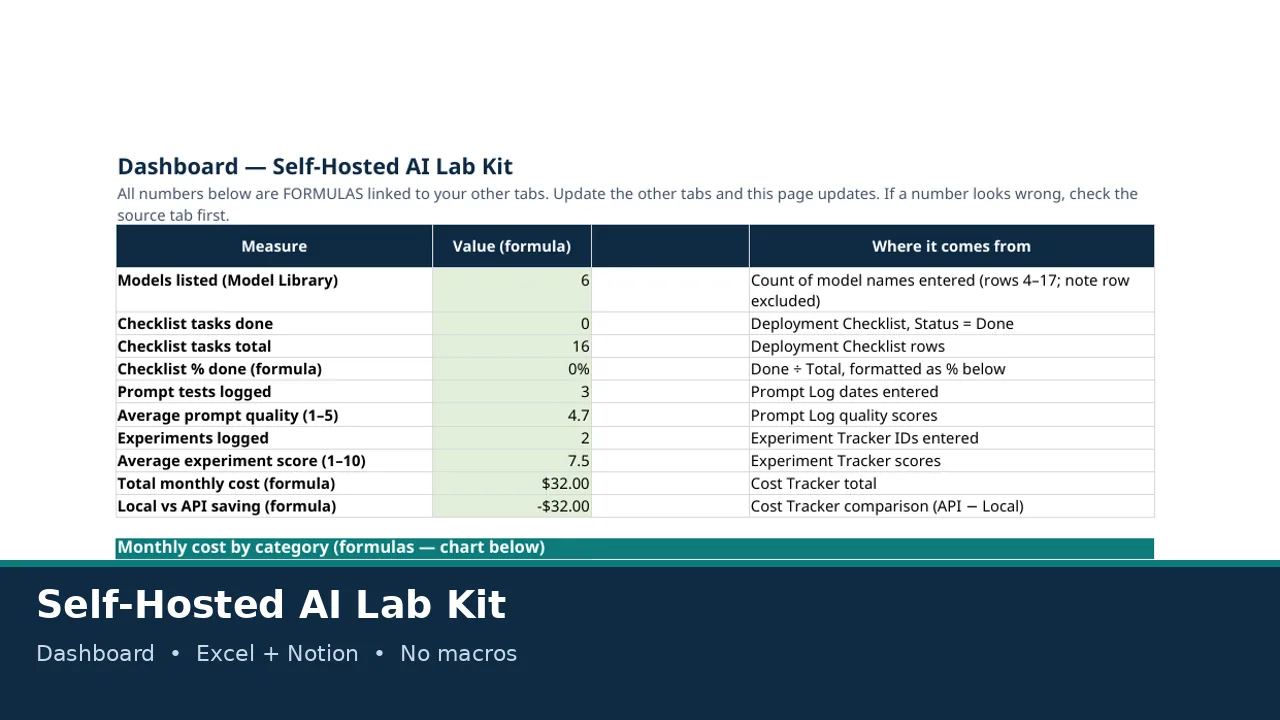
You downloaded three models, forgot which one was fast, which one hallucinated, and whether any of them actually fit your GPU. This kit fixes that. One workbook tracks your models, your hardware, your prompt tests, your experiments, your deployment checklist and your costs — with formulas that do the maths for you. A Notion version mirrors the same structure if you prefer databases to spreadsheets.
What you get
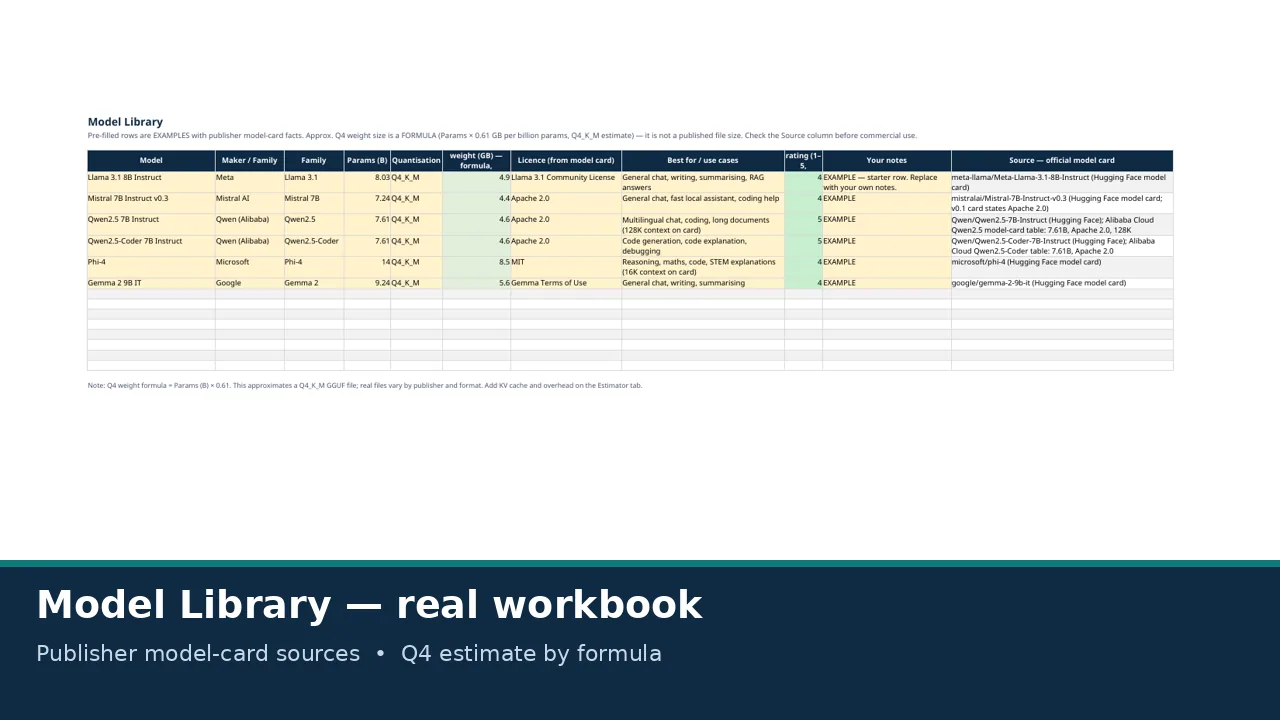
- Model Library — pre-filled with 6 well-known local models, with parameters, quantisation, licence and the publisher's own model-card source for every fact. Starter ratings are clearly marked as opinion, not benchmarks.
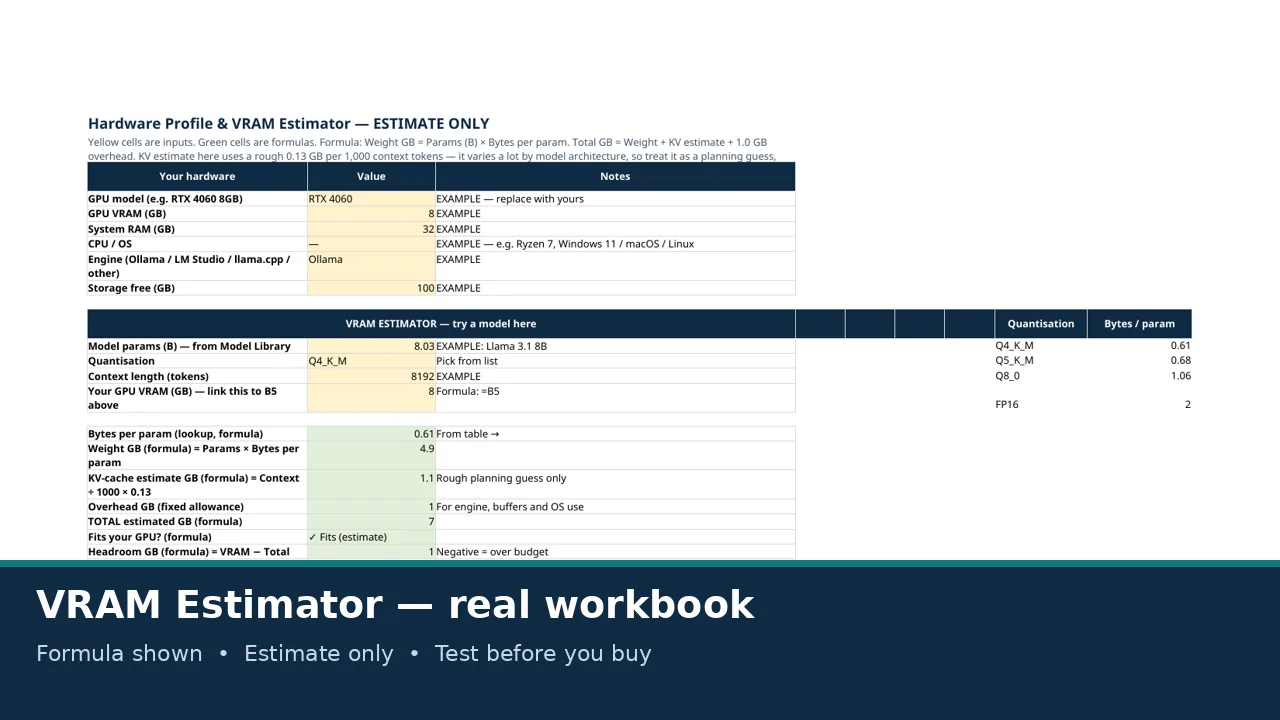
- Hardware Profile & VRAM Estimator — type in your GPU and a model size, and get an estimated fit, with the formula shown in plain sight. Labelled as an estimate throughout — because real performance depends on your engine, context and drivers.
- Prompt Log & Test Results — log the same prompt across models, with tokens/sec calculated automatically.
- Deployment Checklist — install, hardening, backup and update steps, so your local server is not accidentally open to the internet.
- Cost Tracker — electricity, GPU/cloud hours and API fallback, plus a local-vs-API saving formula.
- Experiment Tracker — change one thing at a time, score it 1–10, and actually know what caused the improvement.
- Dashboard with charts — totals, averages and monthly cost by category, all by formula.
- Notion version included — a Markdown home page plus 6 importable CSV databases.
- No macros, no tracking, works in Excel and Google Sheets.
Also included
- 30-item Hardening & Backup Checklist (PDF) — printable, tick-box checklist covering install, network hardening, keys & data, backup and updates.
- 20 Prompt Templates for Local-Model Evaluation (original) — summarising, code, reasoning, RAG, JSON extraction, hallucination resistance and more, each with suggested settings and pass criteria. Run them yourself; no results are pre-filled.
Who it is for — and who it is not for
For: people running Ollama, LM Studio, AnythingLLM, Open WebUI or llama.cpp on their own machine; anyone who has downloaded a model, run out of VRAM, and wants to stop repeating the mistake; hobbyists, students and small teams who want a private, local record — not another cloud dashboard.
Not for: people who want benchmark scores or model recommendations handed to them — this kit helps you run your own tests; it does not pretend to have run them for you — or people who only use hosted APIs and never run anything locally.
How to use it (3 steps)
- Fill in your hardware on the Estimator tab.
- Pick 1–2 models from the Model Library and log your first test.
- Work through the Deployment Checklist, then check the Dashboard.
Questions
Does it work in Google Sheets?
Yes. The workbook is a standard .xlsx with no macros. Upload it to Drive and open with Google Sheets. Validation and formatting carry over; charts may render slightly differently.
Are the VRAM numbers guaranteed?
No — and the kit says so on every relevant tab. They are estimates from a stated formula (parameters × bytes per parameter, plus a KV-cache guess and 1 GB overhead). Engines, context length, batch size and drivers change real use. Always test with your real setup.
Where do the model facts come from?
The publisher's own model card for each model, cited in the Source column. Licences can change, so re-check the card before commercial use.
Is this affiliated with Ollama, Meta, Mistral, Qwen, Microsoft or Google?
No. It is an independent notebook. Those names belong to their respective owners and are used only to identify the models and tools you may already use.
Can I use it for commercial work?
Yes — see Licence below. You may use the kit for personal and commercial projects. You may not resell or redistribute the kit itself.
Is there a free sample?
Yes — the Lite version (2 tabs: Start Here with a mini estimator, and Model Library Lite) is free to share in communities. It is a sample of the full kit, not a substitute for it.
Do you collect my data?
No. The kit contains no tracking, no macros and no external calls. Your filled-in copy stays wherever you keep it.
Licence
Allowed: personal use and commercial use in your own work and projects. Fill it in, adapt the blank rows and templates to your lab, and keep your filled-in copy. Not allowed: reselling, redistributing, sharing publicly, or giving away the kit itself, in whole or in part, in its original or lightly modified form. Do not post it on a public drive, forum or marketplace, free or paid. The free Lite version may be shared freely for community distribution, as provided, without modification to its contents or licence note. Models and tools named in the kit have separate licences that belong to their publishers; this kit's licence does not grant any rights to those models or tools. No warranty: VRAM figures are estimates, model facts should be re-checked on the official card, and the hardening checklist is general good practice, not a security guarantee or legal advice.
AI-assisted creation
This kit was created with AI assistance (writing, spreadsheet construction, and layout), with human verification of the model facts against publisher model cards and of the workbook formulas by opening and recalculating the files. AI assistance does not change the buyer licence above.
Purchase details
Seller: StackGuide. Price: $19. Refund policy: Refunds are available within 3 days of purchase only if a file is corrupted or the product materially does not match its description. Buyers should first email [email protected] so we can send a fixed file. — see the refund policy. Creem is the merchant of record and handles payment and tax. Delivery is an instant digital download after purchase; no setup service is included. Questions: [email protected]. Also available as part of the bundle ($39).